Experiment design
Purpose
This section helps you turn the concept of your MEG experiment into runnable code. Here, “experiment” means the stimulus presentation: usually visual and auditory stimuli, or other perception-type stimuli. The experiment defines the timing of the stimuli, tracks the responses of the participants and controls the different settings related to the content being presented to the participant. This section also lists the requirements that must be met to run your experiment in the NYUAD MEG Lab. Roughly speaking, the experiment should be designed such that:
when the participant performs the experiment, the stimulus triggers a specific response in the brain
you have good reason to believe that the MEG/EEG measurements will clearly highlight this response
The design of an experiment should therefore come after extensive research about the phenomenon you would like to characterize; those details are not covered on this page.
A new experiment in Psychtoolbox or PsychoPy starts from the lab’s template, described in Starting a new experiment from the template below.
Three tools are primarily used for designing experiments in the NYUAD MEG Lab:
Psychtoolbox: a MATLAB-based library (all NYUAD-affiliated students and employees have access to MATLAB)
Presentation: a powerful license-based software (a license is available at the NYUAD MEG Lab)
PsychoPy: an open-source Python library offering both GUI-based and code-based design
Defining the hardware needs for your experiment
Depending on your study, you might need different hardware. The following use cases can be identified:
Show visual stimuli to the participant for a certain amount of time
Allow the participant to send their input via buttons
Get eye-tracking information from the eye tracker
Play audio to the participant
Record the participant’s voice
Hardware involved in experiment
Propixx: is a projector provided by Vpixx that enables delivering high-quality visual stimuli at high refresh rates
Responsepixx: is a button box provided by Vpixx that enables collecting responses from participants
Datapixx: is a digital-to-analog converter that enables controlling the Propixx and collecting responses from Responsepixx button boxes, as well as controlling audio signals sent to participant’s through earplugs - The Datapixx can send triggers using Pixel mode.
Eyetracker: is used to track the participant’s eye movement and estimate pupil size. The eyetracker typically sends the following signals to the MEG-KIT recording computer - The X-coordinate of the eye as a function of time - The Y-coordinate of the eye as a function of time - The area of the pupil as a function of time
Dial: allow continuous-input from participants
Photodiode: for project who requires the highest accuracy in terms of their trigger timing, the photodiode is indispensable
Define your events and trigger protocol
The KIT system has 8 channels (channels 224 to 231 in KIT indexing) that can be used for coding trigger events. The stimulus computer is link Depending on the number of different event types that your experiment requires, you can use one of two trigger-coding modes:
TriggerMode
single_channel: each event code is associated with a single channel. Whenever the event happens, a pulse is sent on that channel, typically lasting for a single frame (8.3 ms on a 120 Hz monitor).TriggerMode
binary_coded: each event code is interpreted as a byte over the 8 channels, which allows up to 255 event types to be represented (the zero code cannot be used to code an event).
The pipeline reads the mode, and what each line (single_channel) or code (binary_coded) means, from the events.json sidecar written next to the events table of every run: sub-<ID>/ses-<SS>/meg/<base>_events.json (see The events sidecar: events.json).
If your experiment is built from the lab template (next section), you do not write
events.jsonyourself. You fillTriggerModeandTriggerChannelsorTriggerCodesonce in theexperiment.jsonof your experiment folder (experiments/psychtoolbox/<your_experiment>/experiment.jsonorexperiments/psychopy/<your_experiment>/experiment.json, copied from the template in Step 1 and edited in Step 2), andnw_savewrites them into theevents.jsonof every run.If your script does not use the template, it writes
events.jsonitself, with at leastTriggerMode(the MSWM experiment, experiments/psychtoolbox/MSWM/MEG_metacog_main.m, is an example).
Starting a new experiment from the template
A new experiment is not written from an empty file. The lab provides a template, in MATLAB (Psychtoolbox) and in Python (PsychoPy), that already contains everything that is the same in every experiment: the start-up window, the window and the devices, the triggers, the reading of the buttons, the saving of the files in the lab’s BIDS layout, and what happens when a run is stopped or crashes. You add what is specific to your experiment, in three places.
Psychtoolbox: experiments/psychtoolbox/template/, and the same template turned into a small experiment in experiments/psychtoolbox/template_demo/
PsychoPy: experiments/psychopy/template/, and experiments/psychopy/template_demo/
The template runs as it is: the word LEFT or RIGHT appears and the participant presses the button on that side.
What is in the template folder
File |
You edit it |
What it is |
|---|---|---|
|
yes, first |
What the experiment is: dataset, task, trigger mode and triggers, devices, responses, extra fields of the start-up window. Written once; everything else reads it. |
|
yes |
The experiment. Two functions are yours: |
|
no |
The start-up window: participant, session, run, official run or test, which devices are on. |
|
no |
The window, the DataPixx triggers, the button box, the eye tracker. It puts your drawing on the screen with or without a trigger, and logs what it sent. |
|
no |
Writes the files (see Saving the files of your experiment). |
|
no |
Optional: a script that calls |
experiment.json is the same file for MATLAB and for Python.
Step 1: copy the folder
Copy the whole template folder next to the other experiments and rename it (experiments/psychtoolbox/my_experiment).
Keep the five files together and commit them with your experiment.
Each experiment keeps its own copy of the lab files (nw_save, nw_launcher, nw_ptb / nw_psychopy).
The template is the current version of the lab and may change; an experiment that already runs keeps the copy it was written and tested with,
so an update of the template never changes what a running study does.
Do not edit your copy of the lab files. If something is missing, ask for it to be added to the template.
To move an experiment to a newer version, replace the lab files of its folder, do a test run and check the output before the next participant.
Every run records which copy wrote it: the snapshot holds
NWSaveVersionandNWSaveFile, and the first lines of the console log show them.
The current version is 1.1.
1.1: the trigger duration is written.
events.jsondeclares how long a pulse is meant to stay on (TriggerDuration), andevents.tsvhas atrigger_durationcolumn with how long each pulse stayed on. Stage 1 of the pipeline compares both with the recording.1.0: first version.
Step 2: describe your experiment in experiment.json
Open experiment.json and replace the content of the template with your experiment.
The file uses the words of the BIDS sidecars it ends up in, so what you write here is what is written next to your data and what the pipeline reads:
nothing in it is typed a second time in the code.
{
  "Dataset": "my-study",
  "TaskName": "mytask",
  "TaskDescription": "The word LEFT or RIGHT appears and the participant presses the button on that side.",
  "Instructions": "Press the left button when you read LEFT and the right button when you read RIGHT.",

  "TriggerMode": "single_channel",
  "TriggerChannels": {
    "KIT224": {"TrialType": "stimulus", "Modality": "visual", "Description": "first frame of the word"},
    "KIT225": {"TrialType": "response", "Modality": "response", "Description": "button press", "PhotodiodePatch": false}
  },

  "Devices": {
    "responsepixx": {},
    "photodiode": {"Patch": "white square, top right corner, on the frames of a stimulus pulse", "SizePx": 100}
  },

  "Responses": {
    "left":  {"Button": "left box/red",  "Key": "f"},
    "right": {"Button": "right box/red", "Key": "j"}
  },

  "Columns": {
    "word": {"Description": "word shown"}
  },

  "Launcher": {"Fields": [
    {"Name": "n_trials", "Label": "Number of trials", "Default": "20"}
  ]}
}
Entry |
Needed |
What to write |
|---|---|---|
|
yes |
The name of the dataset folder of your study on NYU Box. The output goes to |
|
yes |
The task label, letters and digits only. The same label is used for the |
|
recommended |
One or two sentences each. They are copied into the sidecars. |
|
yes |
|
|
with |
One entry per line, named |
|
with |
The same, one entry per code, named |
|
optional |
Length of a trigger pulse in frames. Default 1. It is written in |
|
optional |
What the experiment uses besides the display and the triggers: any of |
|
when the participant responds |
The responses your code waits for, by name. |
|
recommended |
What the columns of your own mean ( |
|
optional |
Intervals between trigger events that the pipeline checks in the recording (see The events sidecar: events.json). |
|
optional |
|
|
optional |
|
An entry whose name starts with _ is ignored: use it for a note. The file must be valid JSON: no comments, text in double quotes, a comma between entries and none after the last one.
A mistake in the file (a missing comma, an unknown entry, a line that is not between 224 and 231, two events on the same line, a trigger without modality when a photodiode is used)
stops the experiment at launch with a message that says what to correct.
Step 3: write your trials
Open main.m or main.py. Two functions are yours.
make_trials returns the list of trials of a run, with whatever your trial needs (the word, the condition, the inter-trial interval). The extra fields of the start-up window are available there.
run_trial is one trial. You draw your stimuli as you always do, on the window the template opened (hw.win),
and instead of flipping the screen yourself you call one of the two flips of the template. It returns the columns of the trial for beh.tsv.
function result = run_trial(hw, trial, k)
% fixation cross, no trigger
nw_ptb('Text', '+');
tFixation = nw_ptb('Flip');

% the word, 500 ms after the fixation, with the trigger "stimulus" of experiment.json
DrawFormattedText(hw.win, trial.word, 'center', 'center', hw.textColor);
tWord = nw_ptb('FlipTrigger', 'stimulus', 'when', tFixation + 0.5, 'trial_index', k, 'word', trial.word);

% one of the "Responses" of experiment.json, for up to 2 seconds
r = nw_ptb('WaitResponse', 2, 'reference', tWord, 'trial_index', k);
if r.pressed
    nw_ptb('FlipTrigger', 'response', 'event_time', r.time, 'trial_index', k, 'word', trial.word);
end

% blank screen for the inter-trial interval
tBlank = nw_ptb('Flip');
nw_ptb('Wait', tBlank + trial.iti);

result = struct('block', 1, 'condition', trial.word, 'word', trial.word, ...
    'response', r.name, 'response_time', r.rt, 'correct', strcmpi(r.name, trial.word));
end
def run_trial(hw, trial, k):
    # fixation cross, no trigger
    hw.text("+")
    t_fixation = hw.flip()

    # the word, 500 ms after the fixation, with the trigger "stimulus" of experiment.json
    word = visual.TextStim(hw.win, text=trial["word"], height=hw.text_size,
                           color=hw.text_color, colorSpace="rgb255")
    word.draw()
    t_word = hw.flip_trigger("stimulus", when=t_fixation + 0.5, trial_index=k, word=trial["word"])

    # one of the "Responses" of experiment.json, for up to 2 seconds
    r = hw.wait_response(2, reference=t_word, trial_index=k)
    if r.pressed:
        hw.flip_trigger("response", event_time=r.time, trial_index=k, word=trial["word"])

    # blank screen for the inter-trial interval
    t_blank = hw.flip()
    hw.wait(t_blank + trial["iti"])

    return {"block": 1, "condition": trial["word"], "word": trial["word"],
            "response": r.name, "response_time": r.rt,
            "correct": r.pressed and r.name.upper() == trial["word"]}
The calls you use inside a trial:
MATLAB |
Python |
What it does |
|---|---|---|
|
|
Shows what you drew, with no trigger. Returns the time of the flip. |
|
|
Shows what you drew and sends the trigger |
|
|
Waits for one of the |
|
|
Shows a text and waits: |
|
|
Draws a centred text; it appears at the next flip. |
|
|
Waits until that time, watching for ESC. |
Things to know when you draw:
Whatever you draw appears at the next flip, and only what you drew since the last flip: a flip with nothing drawn shows an empty screen.
Colours go from 0 to 255. In PsychoPy the window uses pixels with the origin at the centre, and
colorSpace="rgb255".hwholds what your drawing code needs: the window (hw.win), its size (hw.width,hw.height), the duration of a frame in seconds (hw.ifi), the text and background colours.A flip with a trigger ends
PulseFramesframes after the stimulus appeared. To time what comes next, use the time it returned:'when', tWord + 0.3.Do not call
Screen('Flip')orwin.flip()yourself, and do not draw on the top left pixel: the template keeps it black on every flip without a trigger, as Pixel Mode requires.
The start-up window
Starting main opens the start-up window. It is built from experiment.json: one tick box per device, one field per extra field.
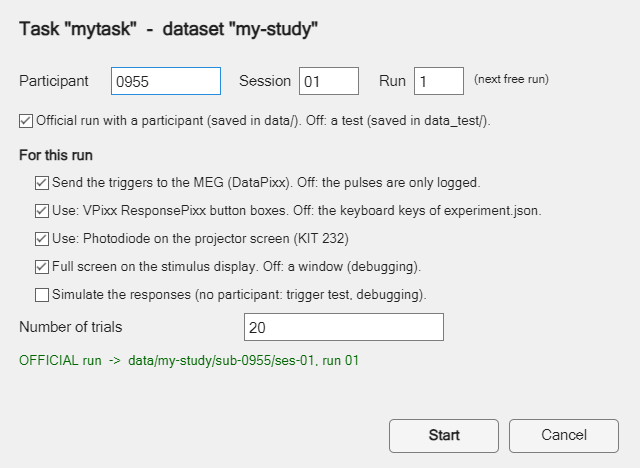
Start-up window of the template (MATLAB). The PsychoPy window has the same fields.
Participant, Session, Run. Letters and digits only. The next free run number is proposed, so a run that is started again never overwrites the previous attempt. The participant and the session of the last launch are proposed again.
Official run. Ticked: the run is saved in
data/. Not ticked: a test, saved indata_test/.For this run. Every device can be switched off for a test: without the triggers the pulses are only logged; without the button box the keyboard keys of
Responsesare used; without full screen the experiment runs in a window, with a visible square in place of the trigger pixel. Simulate the responses answers for the participant, for a trigger test or for debugging.The line at the bottom says where the run will be saved. An official run with something switched off asks for a confirmation.
The window always opens with the standard official run: everything on, full screen, no simulation.
What the template does for you
Everything marked MANDATORY in main is there for one of these reasons.
Part |
What it takes care of |
|---|---|
Start-up window |
Valid participant, session and run; official run or test; which devices are on. |
Start saving |
Checks the names and |
Opening the window and the devices |
Measures the refresh rate; opens the DataPixx with Pixel Mode off; starts the button log; sets up and calibrates the eye tracker and opens its file. |
Introduction page |
Pixel Mode is switched on only once a page with a black trigger pixel is on the screen, and the run waits there for the operator (SPACE), as the lab rules require. Start the MEG recording while it is shown. |
The two flips |
A black trigger pixel on every flip without a trigger; a pulse of |
Saving the trial |
One row of |
End, ESC, error |
ESC at any moment ends the run as |
Random seed |
A different random order in every run, with the seed saved in the snapshot. |
What is optional is marked OPTIONAL in main: a break every N trials, and the devices below.
Optional devices
A device is switched on by adding it to Devices in experiment.json.
Device |
In |
In your code |
|---|---|---|
Button box |
|
|
Photodiode |
|
Nothing. A white square in the top right corner flashes with every pulse, except for the triggers marked |
Eye tracker |
|
Nothing. The calibration runs when the window opens, the message |
Sound |
|
Play the sound with your own code, at the flip that carries its trigger, and give the file with the pulse: |
Microphone |
|
|
Dial |
|
|
In Python the open run is hw.run inside run_trial; in MATLAB nw_save is called directly. Both are described in Saving the files of your experiment.
Testing your experiment
On your own computer. Start
main; in the start-up window untick the triggers, the button box and the eye tracker, untick Official run and Full screen, and tick Simulate the responses. The experiment runs in a window by itself. Run it again without the simulation and answer with the keyboard keys ofResponses.Look at the output in
data_test/<Dataset>/. The end of the console says whether the self-check passed.python nw_save.py check data_test/<Dataset>checks every run of the folder.On the stimulus computer, trigger test. Tick everything except Official run, tick Simulate the responses, and record with MEG160 while the experiment runs (the sensors do not need to be locked). Copy the
.connext to the events files and run stage 1 of the pipeline (trigger count sanity check): it compares the recording withevents.tsvpulse by pulse and checks theTimingConstraints.A full rehearsal with a person, the button box and the eye tracker, still as a test run.
Only then tick Official run.
Does the saving delay the triggers?
No. A trigger is sent by the flip itself: the trigger pixel is part of the frame. The pulse is logged after that flip, and after the flip that ends the pulse, so the logging cannot delay the pulse it logs.
What the logging and saving cost, measured on a lab workstation (not on the stimulus computer):
Step |
MATLAB R2025b |
PsychoPy 2026.2 |
|---|---|---|
Logging a pulse, after the flip that ends it |
0.7 ms (99 % under 2.5 ms) |
0.02 ms |
Saving a trial to disk |
3 ms (99 % under 9 ms) |
3 ms (95 % under 6 ms) |
A frame at 120 Hz lasts 8.3 ms. Three things keep the saving out of the way:
The trial is saved in the inter-trial interval, where the template calls it.
The first complete save of a run is done at the introduction page. The save of the first trial is still longer than the others (up to about 0.1 s), because the tables get their columns then.
Give the same columns on every call. A column that appears for the first time in the middle of a run makes its table be written again in full, which takes longer the longer the run already is.
The timing of the display itself (dropped frames, exact durations) is checked on the real set-up, not here: declare TimingConstraints and run the trigger test above.
The demo
template_demo is the template after its three edits, for a spatial cueing task: an arrow, then a dot on the cued side or on the other side, and a button press.
Compare it with the template to see what a customised experiment looks like. It shows:
binary_codedtriggers with one code per condition (cue_left,cue_right,target_valid,target_invalid,response);an eye tracker and a button box with a single response;
two extra fields in the start-up window (number of trials, percentage of valid cues);
several pulses in a trial with the same columns, and stimuli timed from the previous flip;
a break ended by the participant;
TimingConstraints: the target comes 500 ms after the cue, the response within 1.5 s, and the recording reproduces the intervals of the log.
Saving the files of your experiment
Every experiment run on the stimulus computer saves the same files, with the same names, in the same folders. This is what lets the KIT general pipeline check a recording against what the experiment says it sent (trigger counts, trigger order, timing between triggers) without any experiment-specific code, and it follows the lab’s BIDS naming convention, so the output can be copied into the dataset as it is.
You do not write these files by hand. Two helpers write them, one per language, with the same result:
Python and PsychoPy: experiments/psychopy/template/nw_save.py
MATLAB and Psychtoolbox: experiments/psychtoolbox/template/nw_save.m
An experiment declares which devices it uses and logs what happens; the helper names the files, fills the fixed columns, writes the descriptions, saves after every trial and checks the result when the run ends. Only the files of the devices you declare are written.
With the template (Starting a new experiment from the template) you do not call nw_save for the triggers and the button presses: the flips and the response
function of the template do it, and what the experiment is comes from experiment.json. This section is then the reference for what is written and where,
and for the few calls you may add yourself (a dial, a microphone, a description).
Without the template, for an existing experiment that keeps its own code, it explains how to call nw_save directly.
This section is in three parts:
How to use it without the template: how
nw_saveworks, how to get it into your experiment, a complete example in MATLAB and in Python, what the example writes, every call in detail, and the rules your code must follow.Reference: where the files go, how they are named, which files each device adds, and the columns and fields of every file.
Checking: what the helpers take care of and how to check the output.
How nw_save works
nw_save is one function (MATLAB) or one module (Python) that your own script calls. Four facts are enough to use it.
1. It does not read your variables.
Nothing has to exist in your script beforehand, and no variable needs a particular name.
Everything nw_save needs is given to it as an argument of the call, taken from your own variables, whatever they are called.
nw_save('Trigger', 'cue', tCue, ...) works the same if your flip time is called tCue, vbl or flipTime.
2. It does nothing to your experiment.
It does not send triggers, set the Pixel Mode pixel, open the window, read the button boxes, or record the eye tracker or the microphone.
Your script does all of that exactly as before. nw_save only writes files.
3. It is a logbook.
Each time something happens that must be saved, your script tells nw_save in one line.
nw_save keeps what it is told and writes it into files with the right names, in the right folders, with the right columns.
4. You add calls at five places in your script.
Where in your script |
How often |
MATLAB |
Python |
|
|---|---|---|---|---|
1 |
Near the top: after your dialog has asked for the participant and the session, before the window is opened |
once |
|
|
2 |
Right after every flip that sent a trigger pulse |
once per pulse |
|
|
3 |
When a button was pressed |
once per press |
|
|
4 |
At the end of every trial, in the inter-trial interval |
once per trial |
|
|
5 |
At the very end of the script, and in the part that handles errors |
once |
|
end of the |
What each call does:
Start checks the participant, session and task labels, creates the folders, chooses the run number, starts the console log, and writes the tables with their header line only.
Trigger and Press add one row to a table in memory. Nothing is written to disk at that moment, so they cost almost no time.
Trial adds one row to the trial table and writes everything collected so far to disk. After each trial the files are up to date.
Finish writes everything one last time, records how the run ended, and prints a check of the output.
Two words used below:
A run is one execution of your script, from the moment you start it to the moment it ends. Each run is numbered (
run-01,run-02, …) bynw_saveand corresponds to one.conrecording. If you stop the script and start it again, that is a new run with the next number; nothing is overwritten.Opening a run is the Start call; closing it is the Finish call.
Getting nw_save into an existing experiment
A new experiment starts from the template, which already contains nw_save. For an existing experiment that keeps its own code,
copy the helper into the folder of the experiment, next to its main script, and keep it there:
PsychoPy: copy
experiments/psychopy/template/nw_save.pyand useimport nw_savePsychtoolbox: copy
experiments/psychtoolbox/template/nw_save.mand callnw_save(...)
The rules for the copy are the ones of the template (see Step 1: copy the folder): each experiment keeps its own copy, it is not edited, and every run records which copy wrote it. If the copy that runs is not in the experiment folder, the run starts with a note saying so.
Step by step in MATLAB (Psychtoolbox)
The script below is a small but complete experiment: a cue, a target 500 ms later, and a button response.
The lines marked % <-- nw_save are the only ones added for saving; the rest is the experiment, written the way you want, with your own variable names.
The numbers (1) to (5) are the five places of the table above.
% my_experiment.m   (nw_save.m is in the same folder)

% Your own dialog. The variable names are yours.
answer    = inputdlg({'Participant ID', 'Session'}, 'My study', 1, {'', '01'});
subjectID = answer{1};
sessionID = answer{2};

% (1) START: once, here. After the dialog, before the window is opened.
nw_save('Start', ...                                                  % <-- nw_save
    'experimentDir', fileparts(mfilename('fullpath')), ...  % the folder of this script
    'dataset',       'my-study', ...                        % name of the dataset folder on NYU Box
    'task',          'mystudy', ...                         % task label, the one used for the .con
    'subject',       subjectID, ...                         % from the dialog above
    'session',       sessionID, ...
    'triggerMode',   'single_channel', ...
    'triggers', struct( ...                                 % every pulse this script can send
        'cue',      struct('line', 224, 'modality', 'visual'), ...
        'target',   struct('line', 225, 'modality', 'visual'), ...
        'response', struct('line', 226, 'modality', 'response')), ...
    'devices', {'responsepixx'}, ...                        % what else this script uses
    'triggerDuration', struct('Frames', 1, 'FrameMs', 1000 / 120));   % a pulse stays on for 1 frame at 120 Hz

% Optional: say once what a column of your own means (it goes into the .json files).
nw_save('Describe', 'cue_side', 'side the arrow points to');           % <-- nw_save

try
    % Your own set-up, unchanged.
    win = Screen('OpenWindow', screenNumber, [0 0 0]);
    Datapixx('Open'); Datapixx('EnablePixelMode'); Datapixx('RegWr');
    trigRect  = [0 0 1 1];                    % the top left pixel
    noTrigger = [0 0 0];
    pixel224  = [4 0 0];  pixel225 = [16 0 0];  pixel226 = [64 0 0];

    % nTrials, cueSides, conditions and iti are your own design variables, defined earlier.
    for iTrial = 1:nTrials
        side = cueSides{iTrial};

        % Cue, drawn with the trigger pixel of line 224.
        drawCue(win, side);                                   % your own drawing code
        Screen('FillRect', win, pixel224, trigRect);
        tCue = Screen('Flip', win);                           % this flip sends the pulse

        % (2) TRIGGER: right after the flip that sent a pulse.
        nw_save('Trigger', 'cue', tCue, 'trial_index', iTrial, 'cue_side', side);      % <-- nw_save

        drawCue(win, side);
        Screen('FillRect', win, noTrigger, trigRect);
        Screen('Flip', win);                                  % no pulse on this flip: no call

        % Target, 500 ms after the cue, with the trigger pixel of line 225.
        drawTarget(win, side);
        Screen('FillRect', win, pixel225, trigRect);
        tTarget = Screen('Flip', win, tCue + 0.5);
        nw_save('Trigger', 'target', tTarget, 'trial_index', iTrial, 'cue_side', side);  % <-- nw_save

        % Response: your own code waits for a button for 1.5 s.
        [pressed, tPress, button] = waitForButton(1.5);      % your own function
        rt = [];                                              % [] is written as n/a
        if pressed
            rt = tPress - tTarget;

            % (3) PRESS: once per button press.
            nw_save('Press', tPress, button, 'trial_index', iTrial, 'response_time', rt);   % <-- nw_save

            % Your script marks the press with a pulse on line 226 at the next flip.
            Screen('FillRect', win, pixel226, trigRect);
            tPulse = Screen('Flip', win);
            nw_save('Trigger', 'response', tPulse, 'trial_index', iTrial, ...               % <-- nw_save
                'trigger_delay', tPulse - tPress, 'cue_side', side);
        else
            button = [];
        end

        % (4) TRIAL: once per trial, in the inter-trial interval. This writes to disk.
        nw_save('Trial', 'trial_index', iTrial, 'block', 1, ...                             % <-- nw_save
            'condition', conditions{iTrial}, 'cue_side', side, ...
            'response', button, 'response_time', rt, 'correct', pressed);
        WaitSecs(iti);
    end

    % (5) FINISH: once, at the normal end of the script.
    nw_save('Finish', 'completed');                                                         % <-- nw_save
    sca; Datapixx('Close');
catch err
    % (5) FINISH: also when the script stops on an error, so that nothing is lost.
    nw_save('Finish', 'crashed', err);                                                      % <-- nw_save
    sca;
    rethrow(err);
end
What to notice:
subjectID,tCue,side,rtare variables of this script.nw_savenever looks for them; they are handed to it in the calls. Rename them and only the calls change.'cue','target'and'response'are names you choose in Start. Each later'Trigger'call uses one of these names;nw_savelooks up the KIT line from the name.'cue_side'is a column of your own. Any'name', valuepair you add to a call becomes a column of the table.There is one
'Trigger'call for each flip that sent a pulse, and none for the flips that sent no pulse.The response pulse leaves at the flip after the press, so its call gives the time of that flip and, in
'trigger_delay', how long after the press it came.If the participant is stopped with ESC, call
nw_save('Finish', 'aborted')before leaving the script.
To try all of this without hardware, run experiments/psychtoolbox/template/nw_save_demo.m: it makes the same calls with simulated flip times. help nw_save lists every command.
Step by step in Python (PsychoPy)
The same experiment. start_run returns an object, here called run; the other calls are made on it.
Leaving the with run: block is the Finish call: a normal end saves the run as completed, an error saves it as crashed.
# my_experiment.py   (nw_save.py is in the same folder)
import os
import psychopy
from psychopy import core, visual
import nw_save                                                       # <-- nw_save

# Your own dialog. The variable names are yours.
subject_id, session_id = ask_participant_and_session()               # your own function

# (1) START: once, here. After the dialog, before the window is opened.
run = nw_save.start_run(                                             # <-- nw_save
    experiment_dir=os.path.dirname(os.path.abspath(__file__)),      # the folder of this script
    dataset="my-study",                                             # name of the dataset folder on NYU Box
    task="mystudy",                                                 # task label, the one used for the .con
    subject=subject_id, session=session_id,                         # from the dialog above
    trigger_mode="single_channel",
    triggers={"cue":      {"line": 224, "modality": "visual"},      # every pulse this script can send
              "target":   {"line": 225, "modality": "visual"},
              "response": {"line": 226, "modality": "response"}},
    devices=["responsepixx"],                                       # what else this script uses
    trigger_duration={"Frames": 1, "FrameMs": 1000 / 120},          # a pulse stays on for 1 frame at 120 Hz
    software={"name": "PsychoPy", "version": psychopy.__version__})

# Optional: say once what a column of your own means (it goes into the .json files).
run.describe("cue_side", "side the arrow points to")                 # <-- nw_save

with run:                                                            # <-- nw_save  (5) FINISH is the end of this block
    win = visual.Window(fullscr=True, color="black", units="pix")   # your own set-up, unchanged
    ...

    for i_trial, trial in enumerate(trials, start=1):
        draw_cue(win, trial["side"])                                 # your own drawing code
        draw_trigger_pixel(win, line=224)                            # your own trigger code
        t_cue = win.flip()                                           # this flip sends the pulse

        # (2) TRIGGER: right after the flip that sent a pulse.
        run.trigger("cue", stim_time=t_cue, trial_index=i_trial, cue_side=trial["side"])        # <-- nw_save
        ...
        t_target = win.flip()
        run.trigger("target", stim_time=t_target, trial_index=i_trial, cue_side=trial["side"])  # <-- nw_save

        pressed, t_press, button = wait_for_button(1.5)              # your own function
        rt = None                                                    # None is written as n/a
        if pressed:
            rt = t_press - t_target
            # (3) PRESS: once per button press.
            run.press(stim_time=t_press, button=button, trial_index=i_trial, response_time=rt)  # <-- nw_save
            draw_trigger_pixel(win, line=226)
            t_pulse = win.flip()
            run.trigger("response", stim_time=t_pulse, trial_index=i_trial,                     # <-- nw_save
                        trigger_delay=t_pulse - t_press, cue_side=trial["side"])
        else:
            button = None

        # (4) TRIAL: once per trial, in the inter-trial interval. This writes to disk.
        run.trial(trial_index=i_trial, block=1, condition=trial["condition"],                   # <-- nw_save
                  cue_side=trial["side"], response=button, response_time=rt, correct=pressed)
        core.wait(iti)
To stop on ESC, call run.finish("aborted") and leave the loop.
To try all of this without hardware, run experiments/psychopy/template/nw_save_demo.py.
What these calls wrote
After two trials of the experiment above (a response in the first, none in the second), the folder of the experiment contains:
data/my-study/
    README
    dataset_description.json
    sub-0955/ses-01/meg/sub-0955_ses-01_task-mystudy_run-01_events.tsv
    sub-0955/ses-01/meg/sub-0955_ses-01_task-mystudy_run-01_events.json
    sub-0955/ses-01/beh/sub-0955_ses-01_task-mystudy_run-01_beh.tsv
    sub-0955/ses-01/beh/sub-0955_ses-01_task-mystudy_run-01_beh.json
    sourcedata/sub-0955/ses-01/beh/sub-0955_ses-01_task-mystudy_run-01_desc-console_log.txt
    sourcedata/sub-0955/ses-01/beh/sub-0955_ses-01_task-mystudy_run-01_desc-snapshot_beh.json
    sourcedata/sub-0955/ses-01/beh/sub-0955_ses-01_task-mystudy_run-01_desc-presses_beh.tsv
    sourcedata/sub-0955/ses-01/beh/sub-0955_ses-01_task-mystudy_run-01_desc-presses_beh.json
events.tsv, one row per Trigger call. The first ten columns are filled by nw_save; cue_side is the column the script added.
duration and trigger_duration are n/a because this script did not give them:
onset  duration  trial_type  value  channel  trigger_delay  stim_time  trial_index  sent  trigger_duration  cue_side
n/a    n/a       cue         224    224      0.000000       12.341700  1            1     n/a               left
n/a    n/a       target      225    225      0.000000       12.841700  1            1     n/a               left
n/a    n/a       response    226    226      0.004300       13.258300  1            1     n/a               left
n/a    n/a       cue         224    224      0.000000       15.100000  2            1     n/a               right
n/a    n/a       target      225    225      0.000000       15.600000  2            1     n/a               right
beh.tsv, one row per Trial call, with exactly the columns the script gave:
trial_index  block  condition  cue_side  response  response_time  correct
1            1      valid      left      red       0.412300       1
2            1      invalid    right     n/a       n/a            0
desc-presses_beh.tsv, one row per Press call:
press_index  stim_time  trial_index  device        button         response_time
1            13.254000  1            responsepixx  right box/red  0.412300
(The real files are tab-separated; the columns are aligned here for reading. MATLAB writes whole numbers without decimals, 0 where Python writes 0.000000.)
The .json next to each table describes its columns, and events.json also holds the trigger map given in Start, in the form the pipeline reads.
Each call in detail
Start (MATLAB nw_save('Start', 'name', value, ...); Python nw_save.start_run(name=value, ...)).
The MATLAB names are given first, the Python names in brackets.
Argument |
What to give |
Where the value comes from |
|---|---|---|
|
The folder of your script. The output goes into its |
Copy the expression of the example as it is. |
|
The name of the dataset folder of your study on NYU Box. |
Chosen once for the study; fixed text in the script. |
|
The task label, letters and digits only. |
Fixed text in the script; the same label you type for the |
|
The participant ID, letters and digits only. |
Your launcher dialog. |
|
The session. |
Your launcher dialog, or fixed text. |
|
Leave it out. |
|
|
|
Your launcher dialog (a “test run” option), or fixed. |
|
|
How your script codes its triggers. |
|
Every pulse the script can send: a name you choose, its KIT line ( |
Your trigger protocol. |
|
The names of the other devices the script uses, from: |
Fixed in the script. |
|
Optional. A sentence describing the task, the instructions given to the participant, the clock your times come from, and the intervals between triggers the pipeline should check (see The events sidecar: events.json). |
Fixed in the script. |
|
How long your script keeps a pulse on: |
Fixed in the script: the number of frames your pulse lasts, and the frame duration of the display. |
If a label is not valid, a trigger line is not between 224 and 231, two triggers share a line, or a device name is unknown, Start stops the script with a message that says what to correct. That is why it comes before the window is opened: the message is visible and the participant is not waiting.
Trigger (MATLAB nw_save('Trigger', name, flipTime, 'column', value, ...); Python run.trigger(name, stim_time=..., column=value, ...))
Argument |
What to give |
|---|---|
|
One of the names declared in |
|
The number returned by the flip whose frame carried the pulse ( |
|
The number of the current trial (1, 2, 3, …), the same you give to Trial. |
|
Only for a pulse that comes after the event it marks, such as a button press: the time from the event to the flip, in seconds. Leave it out otherwise (it is then 0). |
|
Only in a test with the triggers switched off: |
|
Optional: how long the stimulus stayed on, in seconds. |
|
Optional: how long the pulse itself stayed on, in seconds: the time returned by the flip that switched the trigger pixel off, minus |
any other column |
A column of your own ( |
Press (MATLAB nw_save('Press', pressTime, button, 'column', value, ...); Python run.press(stim_time=..., button=..., column=value, ...)):
the time of the press, a text naming the button ('right box/red'), and usually trial_index and response_time. Needs responsepixx or keyboard in devices.
Trial (MATLAB nw_save('Trial', 'column', value, ...); Python run.trial(column=value, ...)):
only columns. trial_index must be different for every trial (leave it out and the trials are numbered 1, 2, 3, …); block, condition, response, response_time and correct are recommended; add any other your analysis needs.
A value that does not apply is given as [] or NaN in MATLAB and None in Python, and is written as n/a.
Describe (MATLAB nw_save('Describe', column, text); Python run.describe(column, text)):
optional, once per column of your own, any time after Start. The text is written in the .json of every table that has the column.
A column without a description still works; the check at the end lists it as a warning.
Finish (MATLAB nw_save('Finish', status) or nw_save('Finish', 'crashed', err); Python: the end of the with run: block, or run.finish(status)):
status is 'completed', 'aborted' (stopped on purpose) or 'crashed' (stopped by an error).
Binary-coded triggers. Everything is the same with a code instead of a line:
'triggerMode', 'binary_coded', ...
'triggers', struct('cue',    struct('code', 1, 'modality', 'visual'), ...
                   'target', struct('code', 2, 'modality', 'visual')), ...
trigger_mode="binary_coded",
triggers={"cue": {"code": 1, "modality": "visual"}, "target": {"code": 2, "modality": "visual"}},
Timing checks (optional). In Start you can declare intervals between pulses that the pipeline will check in the recording.
The second constraint below is built by nw_save: it asks that the recording reproduces every interval logged by the script.
'timingConstraints', { ...
    struct('Name', 'cue to target', 'From', 'cue', 'To', 'target', 'GroupBy', 'trial_index', ...
           'ExpectedMs', 500, 'ToleranceMs', 4.2), ...
    nw_save('StimulusLogConstraint', 4.2)}, ...
timing_constraints=[
    {"Name": "cue to target", "From": "cue", "To": "target", "GroupBy": "trial_index",
     "ExpectedMs": 500.0, "ToleranceMs": 4.2},
    nw_save.stimulus_log_constraint(tolerance_ms=4.2)],
Other devices, in both languages
Device |
Python |
MATLAB |
|---|---|---|
EyeLink |
run.eyelink_host_name(): name to open the EDF under on the host PCrun.set_device("eyelink", SamplingFrequency=1000, RecordedEye="right", ...)run.path("edf"): where to receive the file |
nw_save('EyeLinkHostName')nw_save('SetDevice', 'eyelink', 'SamplingFrequency', 1000, ...)nw_save('Path', 'edf') |
Audio |
|
|
Microphone |
|
|
Dial |
|
|
Photodiode |
|
|
Anything else |
|
|
Rules your code must follow
nw_save can only save correctly what it is told correctly. The example above follows all of these rules; this is the complete list.
Software
Python: no package besides the standard library. Tested with Python 3.10 and 3.13.
MATLAB: R2016b or later (
jsonencode). Tested with R2025b.nw_saveis in the folder of the experiment, and that folder comes first: run the main script from its own folder. In MATLAB, ifexperiments/psychtoolbox/generalis also on the path for other functions, the copy in the current folder is the one that runs.
Start and Finish
Call Start exactly once each time the script is executed, near its top: after the dialog that asks for the participant and the session, because Start needs them, and before the window and the hardware are opened, so that a wrong label stops the script while its message can still be read.
Each execution of the script is one run and goes with one
.conrecording. For a new recording, start the script again;nw_savegives it the next run number.Call Finish exactly once, whichever way the script ends: at its normal end (
completed), when it is stopped with ESC or a quit key (aborted), and when it stops on an error (crashed). In MATLAB this means the experiment is insidetry ... catchas in the example; in Python thewith run:block does it. If Finish is never called, the tables are still on disk up to the last trial, but the run is markedrunningand no check is printed.
Names
Participant, session and task labels contain letters and digits only. The task label is the one used for the
.conrecording.The names of triggers and columns contain letters, digits and
_and start with a letter (cue_side). In MATLAB they must be valid field names.Use
data/(official) for participants anddata_test/for everything else, and do not write files of your own into these folders.
Triggers
Declare every trigger in the Start call: its name, its KIT line (
single_channel) or its code (binary_coded), and its modality when a photodiode is used. One line or one code per name; a pulse with an undeclared name is an error.Make one Trigger call for every pulse your code puts on the trigger lines, in the order they are sent, and for nothing else. Stage 1 of the pipeline counts the rows against the pulses of the recording; one forgotten call or one extra call makes the check fail.
Call it also when the triggers are switched off (a test without the DataPixx), with
sentfalse, so that a test run produces the same table.Give the time of the flip that carries the pulse (
stim_time), not the time at which the drawing was prepared. For a pulse that follows an event (a button press), give the time of the pulse and put the delay since the event intrigger_delay.Call it after the flip, never between the drawing and the flip.
Times
All the times you give (pulses, presses, dial readings, recordings) are in seconds and come from one clock: the one that returns the flip times (
Screen('Flip')andGetSecsin Psychtoolbox,win.flip()in PsychoPy). Say which clock it is in theclockargument of Start.A time read from another clock, such as a DataPixx time stamp of a button press, must be converted to that clock before it is given.
Trials and columns
Make one Trial call per trial, in the inter-trial interval, with a
trial_indexthat is unique in the run (1, 2, 3…). The same number goes on the pulses of that trial.Give the same columns on every call, from the first trial on, and use
n/a-able values (Nonein Python,[]orNaNin MATLAB) for what does not apply.Describe every column of your own once (Describe), so that its meaning is in the
.jsonfiles.
Devices
List in
devicesevery device the experiment uses, and only those.EyeLink: open the EDF on the host PC under the name the helper gives, and receive it at the path the helper gives before the Finish call.
Microphone: save each sound at the path the helper returns, before the Finish call.
Photodiode: say where the patch is and on which frames it is white.
While the run is open
Do not open the tables in Excel on the stimulus computer during a run.
MATLAB:
nw_saveuses thediaryfor the console log; do not calldiaryyourself. Aclear allduring the run does not lose it (the function is locked in memory until the Finish call). After a run interrupted with Ctrl-C, callnw_save('Finish', 'aborted')in the Command Window.Python: what is printed goes to the console log; start PsychoPy’s own log file with
run.path("psychopy_log")if you want it too.
The rules of the section Pixel mode experiments below (introduction page, Pixel Mode switched off before it) apply as before.
Where the files go
The output is written inside the folder of the experiment, in data/ for official runs and in data_test/ for test runs.
Both folders are ignored by Git: participant data never enters the repository.
<experiment folder>/
    data/                      official runs
    data_test/                 test runs (same content)
        <dataset>/             name of the dataset folder of the project on NYU Box
            dataset_description.json
            README
            sub-<ID>/ses-<SS>/
                meg/<base>_events.tsv                 one row per trigger pulse
                meg/<base>_events.json                trigger mode, trigger lines, photodiode, column descriptions
                beh/<base>_beh.tsv                    one row per trial
                beh/<base>_beh.json
            sourcedata/sub-<ID>/ses-<SS>/
                beh/<base>_desc-console_log.txt       everything printed during the run
                beh/<base>_desc-snapshot_beh.json     settings, devices, versions, status of the run
                beh/<base>_desc-presses_beh.tsv       + .json   (responsepixx, keyboard)
                beh/<base>_desc-dial_beh.tsv          + .json   (dial)
                beh/<base>_desc-voice_beh.tsv         + .json   (microphone)
                eyetrack/<base>_eyetrack.edf          + .json   (eyelink)
                audio/<base>_desc-voice<NNN>_audio.wav          (microphone)

<base> = sub-<ID>_ses-<SS>_task-<task>_run-<RR>
After the session, copy the content of data/<dataset>/ into the dataset folder of the project on NYU Box and put each KIT recording
next to its events files, with the same name: sub-<ID>/ses-<SS>/meg/<base>_meg.con.
The pipeline pairs a recording with the events.tsv and events.json that have the same name.
File names
Part |
Rule |
|---|---|
|
Participant ID of the study, the same as the one typed on the KIT acquisition computer. Letters and digits only. |
|
Session. Always written, |
|
Task label of the experiment, letters and digits only ( |
|
Two digits. One run is one launch of the experiment and one |
A label that contains anything else (a space, -, _) stops the experiment at launch with a message, before the participant is in the MSR.
Which files, by device
The display (PROPixx), the console log and the snapshot need no declaration.
Triggers are declared with the trigger mode; every other device is declared by name in devices.
Device |
Declared as |
What is written |
What your code logs |
|---|---|---|---|
DataPixx triggers (KIT 224 to 231) |
trigger mode |
|
one call per pulse, with the time of the flip that carries it |
No triggers (rest) |
trigger mode |
no events files; the pipeline then reports the recording as having no triggers to check |
nothing |
ResponsePixx button boxes |
|
|
one call per press |
Keyboard (tests outside the MSR) |
|
same table, |
one call per press |
Photodiode (KIT 232) |
|
|
the modality of every trigger (required with this device) and a description of the patch |
EyeLink eye tracker |
|
|
the calibration result; your code receives the EDF from the host PC and saves it at the path the helper gives |
Sound played to the participant |
|
|
the sound file of each auditory pulse |
Microphone |
|
|
one call per recording; your code saves the sound at the path the helper returns |
Dial |
|
|
one call per reading |
A device that is not in the list above can still be saved the same way: declare a table of your own (add_table in Python, 'AddTable' in MATLAB)
and it is written as sourcedata/.../beh/<base>_desc-<name>_beh.tsv with its .json.
To add a device to the standard itself, add one entry to DEVICES in nw_save.py and to localDevices in nw_save.m.
The events table: events.tsv
One row per trigger pulse, in the order the pulses are sent. The table starts with these columns, in this order; the columns of your experiment follow.
Column |
Content |
|---|---|
|
|
|
Duration of the event in seconds (time on screen, length of the sound); |
|
Name of the event ( |
|
Event code. |
|
KIT line that carried the pulse; in |
|
Seconds from the event to its pulse. 0 when the pulse leaves on the frame that shows the event. For a button press, the time from the press to the pulse. The pipeline subtracts it: |
|
Time of the pulse on the clock of the stimulus computer, in seconds: the time returned by the flip that carries the pulse. |
|
Trial the pulse belongs to, the same number as in |
|
1 if the pulse was sent to the KIT system, 0 if not (a test run with the triggers off). |
|
How long the pulse stayed on, in seconds, as measured by the experiment: from the flip that starts the pulse to the flip that ends it. |
Three rules follow from how the pipeline reads the table:
Log every pulse, and nothing that is not a pulse. Stage 1 compares the number of rows with the number of pulses in the recording, line by line.
Keep the rows in the order the pulses were sent;
stim_timenever goes back.An event that sends no pulse (a practice trial, a fixation cross without trigger) belongs in
beh.tsv, not here.
The file is tab-separated (.tsv). The pipeline still reads the .csv tables of older experiments, but new experiments write .tsv.
In binary_coded mode the code is in value; earlier versions of this page called the column binary_code, which the pipeline does not read.
The events sidecar: events.json
The pipeline needs the table and its .json together. A recording whose events.json has no TriggerMode is skipped.
Field |
Content |
|---|---|
|
|
|
|
|
|
|
Number of pulses sent per line or per code in this run. Compare it with what you see in MEG160 after a test. |
|
|
|
Optional. The intervals between trigger events that stage 1 checks in the recording, for example “the target comes 500 ms after the cue”. |
|
How long a pulse is meant to stay on, as a number of frames: |
|
Software and version, which clock |
one entry per column |
|
{
  "TaskName": "mystudy",
  "RunStatus": "completed",
  "TriggerMode": "single_channel",
  "TriggerChannels": {
    "KIT224": {"TrialType": "cue", "MNEChannel": "MISC 001", "Modality": "visual", "PhotodiodePatch": true, "Description": "arrow cue on screen"},
    "KIT225": {"TrialType": "target", "MNEChannel": "MISC 002", "Modality": "visual", "PhotodiodePatch": true, "Description": "grating"},
    "KIT226": {"TrialType": "response", "MNEChannel": "MISC 003", "Modality": "response", "PhotodiodePatch": true, "Description": "button press"}
  },
  "ExpectedTriggerCounts": {"KIT224": 120, "KIT225": 120, "KIT226": 113},
  "Photodiode": {"Used": true, "Channel": "KIT232", "MNEChannel": "MISC 009", "Patch": "white square, top right corner, on the frames a trigger line is high"},
  "TriggerDuration": {"Frames": 1, "FrameMs": 8.3357},
  "TimingConstraints": [
    {"Name": "cue to target", "From": "cue", "To": "target", "GroupBy": "trial_index", "ExpectedMs": 500.0, "ToleranceMs": 4.2},
    {"Name": "response window", "From": "target", "To": "response", "GroupBy": "trial_index", "MaxMs": 1500, "Required": false},
    {"Name": "recording against the stimulus log", "From": "*", "To": "*", "ExpectedFromColumn": "stim_time", "ColumnUnit": "s", "ToleranceMs": 4.2, "OnlyBelowMs": 10000}
  ]
}
The last constraint is worth declaring in every experiment: it asks that every interval between two consecutive pulses in the recording
equals the interval the stimulus computer logged in stim_time, which catches dropped frames and missing pulses anywhere in the run.
Both helpers build it for you (stimulus_log_constraint in Python, 'StimulusLogConstraint' in MATLAB). The fields of a constraint, and how
TriggerDuration is checked, are described on the
trigger count sanity check page.
The bids-template dataset on NYU Box (MEG/Data/bids-template) has a complete events table and sidecar for each trigger mode,
and a recording that passes stage 1; its README.md describes every column and field.
The behavioural table: beh.tsv
One row per trial, including the trials that send no trigger.
Column |
Status |
Content |
|---|---|---|
|
required |
Trial number within the run, 1 for the first trial. The same number as in |
|
recommended |
Block number within the run. |
|
recommended |
Experimental condition of the trial. |
|
recommended |
Response given; |
|
recommended |
Seconds from the event the participant responds to, to the response. |
|
recommended |
1 correct, 0 wrong, |
Add any column your analysis needs (stimulus, list, side, planned and measured durations) and describe it in the .json.
Device tables
All times are on the same clock as stim_time.
Table |
Columns |
|---|---|
|
|
|
|
|
|
The EyeLink recording stays in its native EDF format under sourcedata; its .json holds SamplingFrequency, RecordedEye, CalibrationType,
the calibration result you pass, the name the file had on the host PC (at most 8 characters, the helper builds it) and the mapping of the analog outputs to KIT 233 to 239.
Console log and snapshot
<base>_desc-console_log.txtholds everything the experiment printed, including error messages. It is started by the Start call, so a run that stops at the first trial still leaves it.<base>_desc-snapshot_beh.jsonholds what is needed to know later how the run was made: status (initialized,running,completed,abortedorcrashed), start and end time, devices and their settings, trigger map, counts, software versions, computer, script, Git commit of the repository, the error when the run crashed, and anything you add (display settings, the choices made in the launcher).PsychoPy’s own log, when you use it, goes next to them as
<base>_desc-psychopy_log.txt(run.path("psychopy_log")).
What the helpers take care of
Nothing is lost when a run stops early. The tables are saved after every trial, and the console log from the first line. A run that ends with an error is saved as
crashedwith the error in its snapshot; a run that is restarted takes the next run number.Saving does not disturb the timing. Logging a pulse only stores it in memory; saving a trial adds lines to files that are kept open. The measured costs are in Does the saving delay the triggers?. Log a pulse after the flip that carries it, never between the drawing and the flip, and save the trial in the inter-trial interval.
Give the same columns from the first trial on. A column that appears for the first time in the middle of a run makes the table be written again in full, which takes longer the longer the run already is.
A file that is open in another program (Excel) cannot be replaced: the helper then saves beside it as
<name>.unsaved-<time>and prints a warning, so the data is still on disk.
Checking the output
At the end of every run the helper prints a self-check: missing files, pulses that were not sent, columns without a description, a missing EDF or sound file.
The same check, and the check of names, columns and sidecars, can be run at any time on a whole folder, whichever language wrote it.
From the folder of the experiment (a MATLAB experiment uses nw_save.py from experiments/psychopy/template):
python nw_save.py check data/<dataset>
Before the first participant, do a full test run with the triggers on while MEG160 records (the sensors do not need to be locked, see below),
copy the .con next to the events files and run stage 1 of the pipeline
(trigger count sanity check):
it compares the recording with events.tsv pulse by pulse and checks the TimingConstraints.
Experiments written before this standard (for example the attention and masked priming tasks) write this layout with their own code and are read by the pipeline as they are.
New experiments use nw_save.
Files produced by the experiment design
A Psychtoolbox experiment is a
.mMATLAB script.A Presentation experiment is a
.expexperiment file.A PsychoPy experiment is a
.pyscript, or a.psyexpfile when it is designed in the Builder.
If you are using the PsychoPy Builder:
Open the file with the
.psyexpextensionRun the experiment directly from within the Builder
Pixel mode experiments
All experiments that use the Vpixx pixel mode should follow these rules:
Once the experiment script is launched, the experiment should land on an Introduction page that requires a button press from the project owner to continue (the participant should not be able to move past this page)
Before landing on the Introduction page, your script should deactivate the Vpixx Pixel Mode; otherwise, false trigger events could appear in the data recording
“Psychtoolbox” based experiments
To flip a visual to the screen without sending a trigger, make sure that every
Screen('Flip', win);is preceded byScreen('FillRect', win, black_rgb, trigRect);(i.e. the top left pixel of the screen is black, which means no trigger)Start from the template (see Starting a new experiment from the template): it keeps the trigger pixel black on every flip without a trigger and saves the files of the experiment, including the MATLAB console output
“Presentation” based experiments
Experiments coded in “Presentation” do not enable the Vpixx pixel mode by default.
If your experiment uses Pixel Mode (i.e., you are using the color of the top left pixel of the screen as a condition to send triggers), you must run the enablepixelmode.m script first.
The script is available in experiments/psychtoolbox/general/enablepixelmode.m.
KIT experiment length
A single KIT .con recording can last at most 4000 seconds (about 66 minutes).
An experiment that requires more than this should therefore be split into blocks, each ideally lasting no more than 55 minutes (to keep a safety margin).
When a recording reaches its maximum length, a new recording must be started (this is described in the KIT operational protocol).
KIT system testing triggers
If you are in the testing phase of your experiment and would like to test the triggers, you can do so without locking the sensors. Simply open MEG160, go to Acquire -> MEG Measurement, then run your experiment from the stimulus computer and observe channels 224 to 231 to check for trigger signals.
Building the requirements of your experiment
The number of participants and the number of trials determine how clean the averaged evoked response (ERP) data is. The signal-to-noise ratio (SNR) of an average is proportional to the square root of the number of trials:
averaging 10 trials gives about 3 times better SNR than a single trial
averaging 100 trials gives 10 times better SNR than a single trial
Example Experiments MEG